The evolution of memory protection and isolation techniques
Modern embedded systems must deal with all sorts of security threats, so memory protection has come a long way since its inception. It started with basic tools like the MPU (Memory Protection Unit), but now we have more advanced tools and features like hardware firewalls, Secure Boot, and TrustZone. Each of these plays a specific role in memory protection and isolation, and together, they can be layered to create a very secure and robust system.
By Bea Ben Ali
Abstract
Modern embedded systems must deal with all sorts of security threats, so memory protection has come a long way since its inception. It started with basic tools like the MPU (Memory Protection Unit), but now we have more advanced tools and features like hardware firewalls, Secure Boot, and TrustZone. Each of these plays a specific role in memory protection and isolation, and together, they can be layered to create a very secure and robust system.
Here is a timeline of the arrival of each one
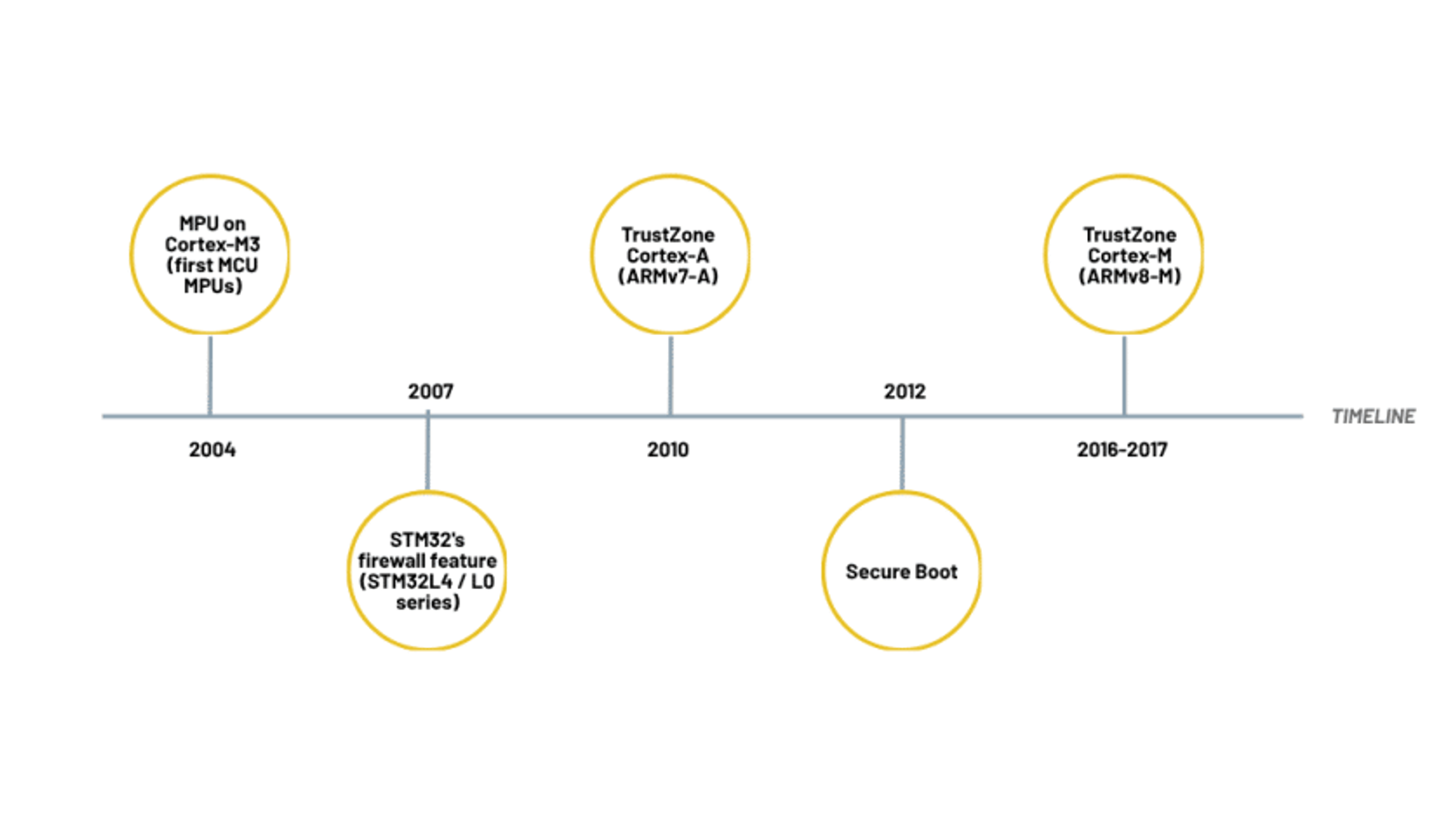
Memory protection is all about making sure that programs or processes only access the parts of memory they’re supposed to, which helps stop accidental or unauthorized reading and writing. Memory isolation techniques take this a step further by making sure different parts of your software run in their own space without interfering with each other. This helps contain problems and reduces the risk that a security flaw in one part of the system can cause trouble elsewhere.
Introduction
How do memory protection and hardware isolation techniques work? And how do they work on ARM Cortex-M architectures? The Cortex-M journey started with Cortex-M3, and over time, the family grew to fit different needs. Now, Arm offers architectures that include Cortex-M0 and M0+, Cortex-M4, Cortex-M7, and the newer Cortex-M23 and Cortex-M33, which add built-in TrustZone security to help keep devices safe.
The goal of this blog is to understand the different memory protection and isolation techniques available for Cortex-M and when to apply each one of them. The techniques discussed can be adapted to suit a wide range of microcontrollers (MCUs) such as those produced by STMicroelectronics, NXP, and Texas Instruments.
MPU
What does the MPU do?
The Memory Protection Unit restricts which parts of memory a task or process can access, which helps prevent unintended access to critical parts of the system.
When do we need the MPU?
The MPU solves several critical issues that include the following criteria:
- Unauthorized code execution
- Protecting critical data from being overwritten
- Preventing access to peripherals by unauthorized or non-trusted code.
- Ensuring that tasks cannot access each other’s memory, thereby enhancing task isolation.
If you have met one of these criteria, the MPU can do the work for you.
What should you know before configuring the MPU?
Before you set up the MPU, you’ll need to figure out a few things about each memory region. Basically, you have to decide:
- The start and end addresses of the region
- Whether the memory is primary (like RAM or flash) or auxiliary (like a peripheral)
- Whether it’s read-only or read-write
- If access is limited to privileged code or also allowed for unprivileged code
- Whether code execution is allowed from this region
- Whether the region should be shareable with other system components
- Whether it should be cached
Once you define the memory attributes described above, you can set up the MPU to solve the criteria as discussed above.
Firewall
What is the role of the firewall?
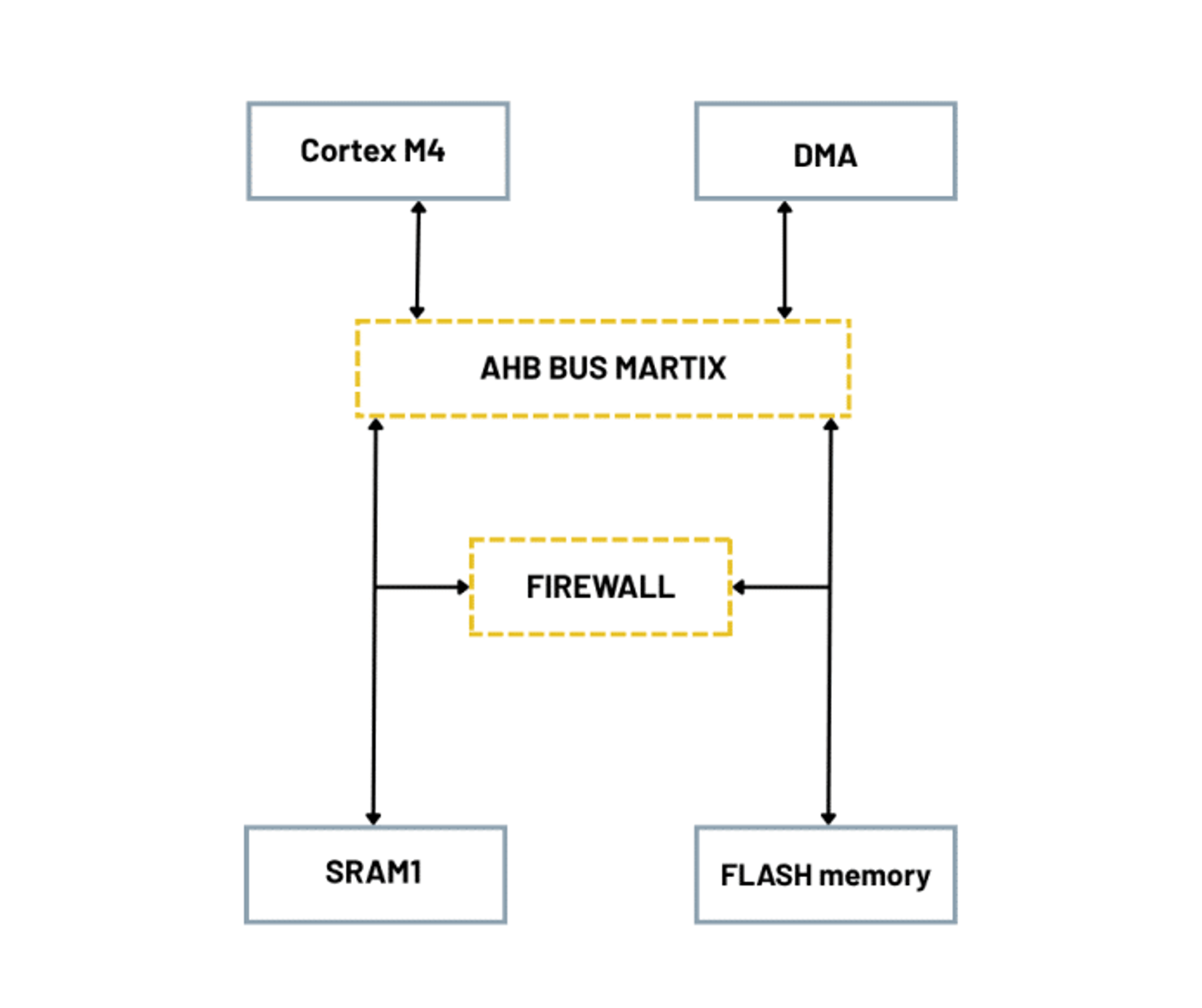
The hardware firewall acts as a gatekeeper to enforce rules that determine which parts of the system can access certain memory regions or resources; these subsystems may include CPUs, DMA controllers, or peripherals, for example. Conceptually, this firewall is similar to the network firewalls that control internet traffic, but its focus is internal hardware communications within the MCU.
What does the firewall provide that the MPU does not?
If any untrusted code tries to read or write a protected region, the firewall causes the system to immediately reset or fault.
What issues does the firewall fix?
- Unauthorized access to sensitive data such as secret keys in SRAM.
- Unauthorized access to sensitive code.
How does it work?
The diagram below shows an overview of where the FireWall stands within an STM32L4 as an example
Secure boot
Secure Boot is the process of checking and verifying code or firmware before the system allows it to run.
Why use Secure Boot?
Secure Boot operates under the idea that systems should only run software that has been verified to prove that it can be trusted. To begin this process, the system needs a reliable starting point that can be fully trusted from the start; this is known as a Root of Trust.
What is a Root of Trust (RoT)?
A Root of Trust (RoT) is a trusted part of the system that everything else depends on; if the system were a building, the RoT would be the foundation. If the RoT fails, the entire system is at risk because everything relies on it to work correctly.
What does the RoT do and where is it found?
The RoT is stored in Read-Only Memory (ROM) and contains or verifies the public key used to check firmware signatures as it performs the very first signature verification. If the signature is valid, it passes control to the next software layer.
The RoT initiates the chain of trust as follows:
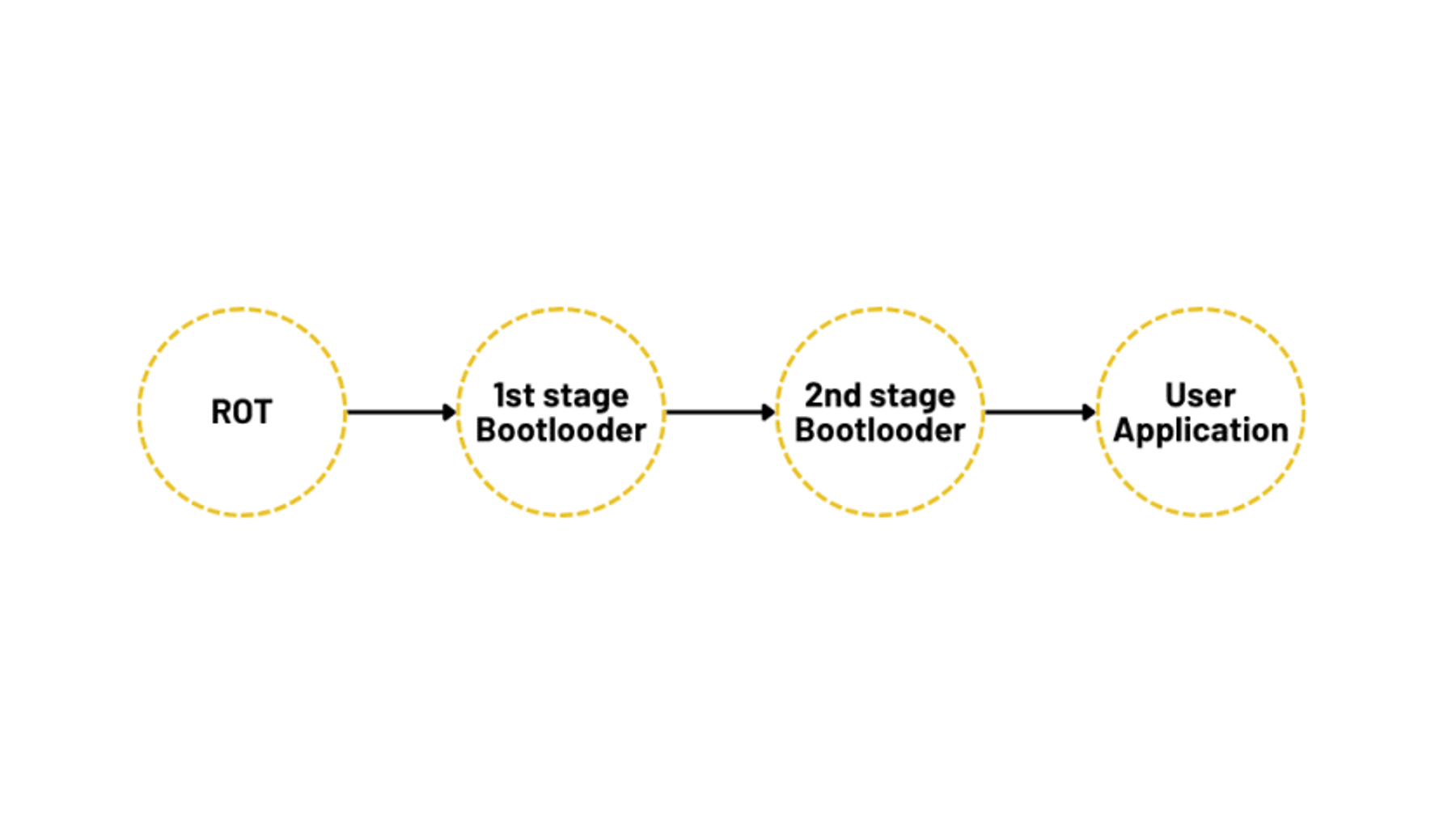
The chain of trust is essentially a trust-based hierarchy of certificates and certificate providers.
Secure Boot works as a chain of trust during startup; it checks that each part of the system hasn’t been tampered with, such as the firmware and drivers., and Sstarting from the RoT, each component verifies the next using digital signatures and hashes. If everything checks out, the system continues to boot securely.
TrustZone
Before introducing TrustZone, let’s first discuss why this technology came to be.
MPUs face a limitation in multicore systems as they can only manage access control to one core at a time. This means that one core can violate access to another core’s peripherals while the MPU serves a different core. You can prevent security violations by configuring each core’s MPU to do so, but this does not fully address the problem since each core has visibility and control over its own MPU. No cross-configuration is involved.
Let’s take the STM32H7 as an example. This dual-core system includes separate MPUs for its Cortex-M7 and Cortex-M4 cores, which means that if you configure a memory region as read-only on one core, the other core’s MPU won’t automatically know this or enforce the same rule; each core is responsible for managing its own memory protection settings. Additionally, because both cores may access shared memory, the STM32H7 must ensure data consistency between the two cores.
To overcome this limitation, ARM created TrustZone technology, which was first introduced for Cortex-A before later being expanded to support Cortex-M.
When should you use TrustZone?
- Keeping only critical logic or sensitive data in a trusted zone
- Wanting the non-secure world to use a cryptographic function without exposing the key
- Authenticating devices without revealing keys
- Performing secure firmware updates
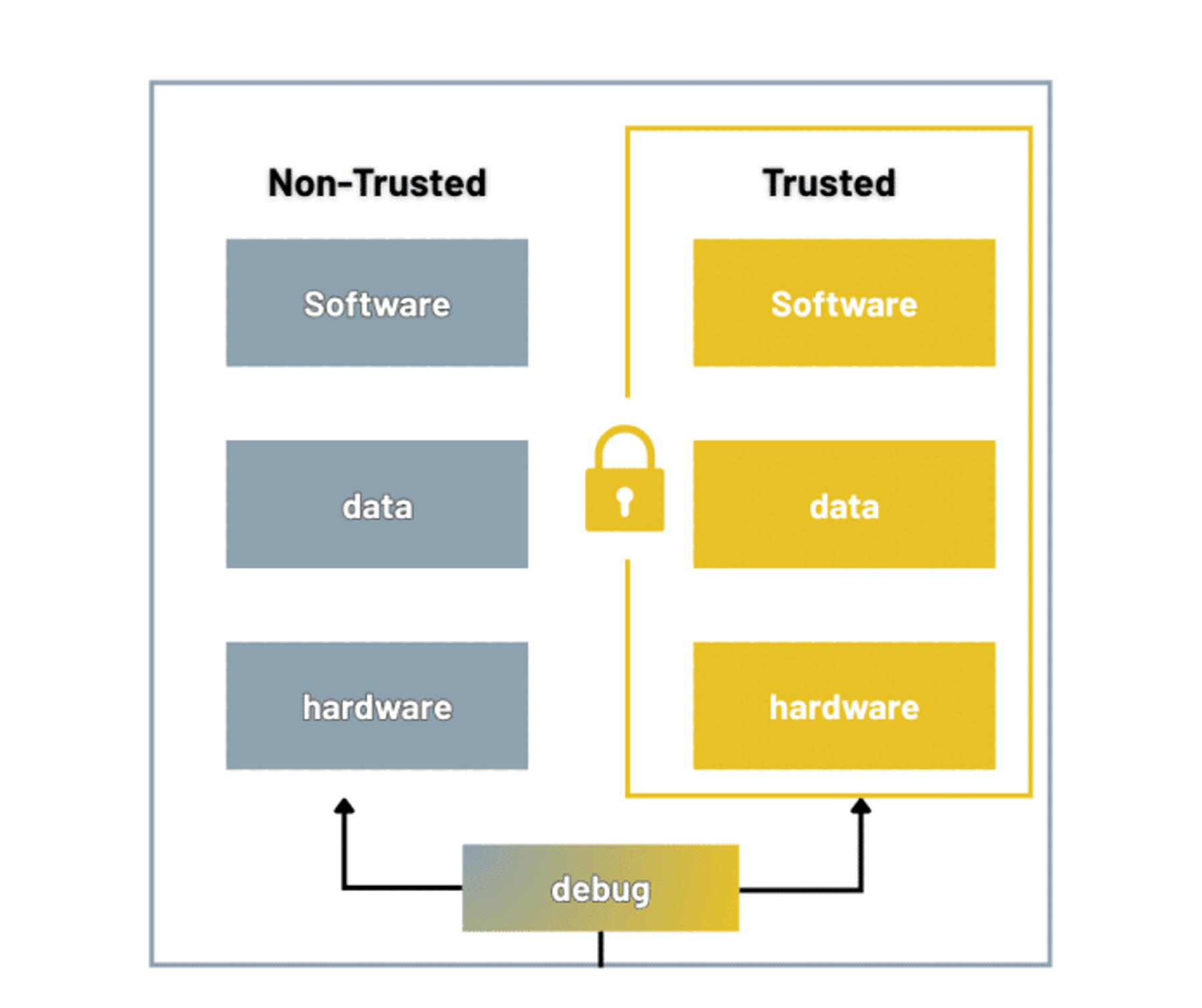
All credit goes to ARM for this figure
The principle of TrustZone is to split the system into secure and non-secure worlds. With TrustZone, the CPU can flip between two modes: secure and non-secure. In secure mode, it runs trusted code that only accesses secure memory and peripherals. Once everything has been verified, the CPU hands control over to the non-secure side, where regular application code runs.
Even though secure and non-secure code share the same CPU, TrustZone ensures they stay well separated. Non-secure code can only call certain secure functions that are intentionally exposed, while the rest of the secure world remains locked down. At any moment, the CPU is focused on either secure or non-secure tasks, never both at the same time. This way, sensitive operations stay protected without slowing down your main application.
TrustZone also makes sure that untrusted applications only run in a Rich Execution Environment (REE), i.e., where your regular operating system and apps run, while trusted applications run in a Trusted Execution Environment (TEE).
What is a Trusted Execution Environment (TEE)?
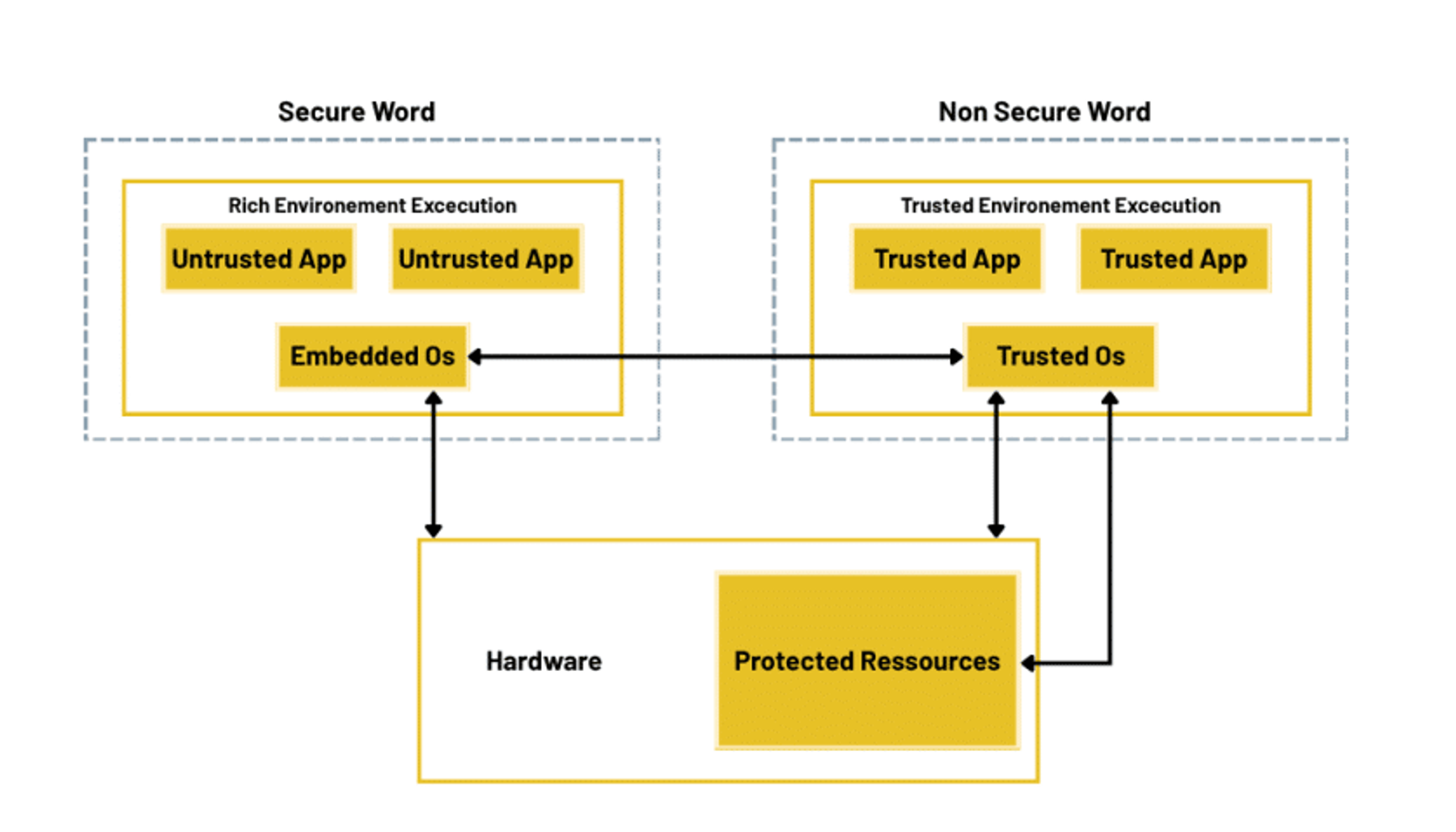
The TEE is an isolated processing environment in which applications can be securely executed irrespective of the rest of the system. It is designed to run sensitive code safely, even if the rest of the system gets hit by malware or bugs. Both the code and the data inside the TEE are protected by hardware, so it is difficult for attackers to gain access.
When is a TEE used?
The TEE can be used to safely store cryptographic keys, manage secure logins, or carry out sensitive tasks like generating digital signatures or performing a secure boot, all without ever exposing confinedthis data or logic to the rest of the system.The TEE is an isolated processing environment in which applications can be securely executed irrespective of the rest of the system. It is designed to run sensitive code safely, even if the rest of the system gets hit by malware or bugs. Both the code and the data inside the TEE are protected by hardware, so it is difficult for attackers to gain access.
Closing
The MPU was one of the first tools used to protect embedded systems. It was simple but effective for keeping memory access in check. As security needs grew, technologies like TrustZone and Secure Boot came along, bringing stronger, system-wide protection using cryptography and trusted execution.
Could more be said about TrustZone and the other memory protection and isolation techniques discussed in this blog? Definitely yes. Each one is a deep topic on its own, but we hope this broad overview has given you a better understanding of the various isolation methods available for Cortex-M architectures and the security protections they offer.
References
- Using a memory protection unit with an RTOS, part 2 – Embedded Computing Design
- 5 Elements to Secure Embedded System – Part #2 Root-of-Trust (RoT)
- [STM32] MOOC Security#MPU (Memory Protection Unit) : 네이버 블로그
- Memory Protection Unit
- Firewall usage
- A Beginner’s Guide to Root of Trust and Secure Boot | by Chani Bonner | Medium
- What Is Trusted Execution Environment (TEE) & How Does It Work? | Trustonic
- What Is Arm TrustZone Technology? – Hardware Based Isolation, TrustZone Trustonic
- Using the FIREWALL embedded in STM32L0/L4/L4+ Series MCUs for secure access to sensitive parts of code and data